
Melamine MDF brings a coordinated, ready-finished look to home-office desks, shelves and storage fronts. Choose the decor around your room, then plan supports, cable access and equipment attachments around daily use. We manufacture MDF and apply the decorative facing in our factory, with sheets and processed parts to suit your furniture project.
Melamine MDF for furniture Woodgrain melamine MDF Black melamine MDF Melamine colour catalogue
Plan the workspace around your equipment
Start with the actual equipment: monitor stands or arms, keyboard, printer, speakers, chargers and any filing or storage load. Mark what sits on the desktop, hangs from it or needs clearance underneath. Leave space for legs, movement and access to fittings.
The HSE workstation checklist considers the equipment, furniture and environment together. We use that as a useful planning principle: a material selection alone cannot establish that a desk is comfortable or suitable for its user.
For a shared household workspace, record whether the desk is fixed, adjustable or likely to move. A printer shelf, a sit-stand desktop and a decorative storage front should not receive identical panel requirements simply because they share one colour.
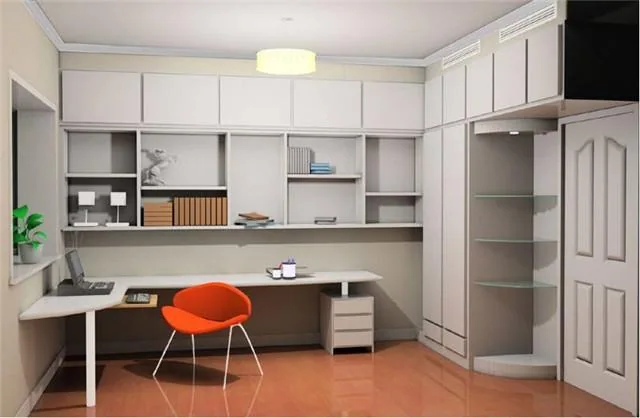
Design the desktop with its supports and attachments
Identify the clear spans between supports and the location of concentrated loads. A monitor arm attached near an edge can create a very different demand from a monitor standing on its base. Check the arm manufacturer's clamp range, contact arrangement and compatibility with the desktop construction.
The EPF office-furniture guidance describes MDF tops in relation to their underframes and supports. The relevant lesson is the assembled arrangement, not a universal thickness copied from an example.
For a sit-stand frame, include top mass, dimensions, fixing positions and the equipment load in the frame review. Confirm that screws will not break through the finished face and that their engagement suits the core. Support or reinforcement details should be resolved with the furniture or hardware designer rather than improvised after delivery.
Choose the face for screen lighting and daily contact
Evaluate a finish sample in the intended desk position, including daylight and task lighting. Review reflections from the desktop and neighbouring fronts as well as those on the screen. A finish named matt is not a guarantee that every lighting arrangement will be comfortable.
Try writing on paper, moving the intended mouse and resting a forearm against a representative finished edge. Texture, joints and edge shape affect these everyday contacts. A highly textured decor that suits a vertical storage front may need a separate writing surface on a desktop.
Keep colour coordination separate from surface performance. If the workstation faces frequent abrasion or other demanding use, compare the required surface evidence and alternative facing constructions. Our melamine finish selection guide explains how to record the appearance reference.
Put cable openings and service access on the drawing
A grommet, a cable tray and a power-module opening are distinct details. Record their dimensions and positions relative to the finished panel edges and frame. Check the fittings themselves rather than relying on a generic hole diameter.
Cut-outs expose the core and reduce the local section. Specify the required edge treatment and keep openings clear of fixings and highly stressed areas according to the design. A plastic grommet may conceal a cut edge without creating a watertight seal.
Show how plugs and connectors pass through the opening, how the tray can be accessed and where cables travel when an adjustable desk moves. Furniture machining should follow the equipment requirements; electrical installation and ventilation requirements remain part of the equipment installation, not a property of the decorative board.

Plan storage loads and furniture movement
| Part | Use to describe | Detail to resolve |
|---|---|---|
| Book or file shelf | Sustained load and support spacing | Deflection, supports and adjustment holes |
| Drawer pedestal | Loaded drawers and repeated opening | Runners, connections and unit stability |
| Mobile storage | Loaded movement over the actual floor | Castor attachment and base construction |
| Privacy screen | Visual separation and incidental contact | Stable mounting; separate evidence for acoustic claims |
Do not infer a sound-absorption rating from an MDF screen or a few decorative holes. Similarly, a furniture board name does not establish tip resistance or the adequacy of a wall fixing. Check the complete furniture system and its intended installation.
For component sizing, our cabinet-panel guide separates shelves, sides, fronts and backs.
Allow for heat, drinks and routine cleaning
A workspace can expose the surface to coffee, ink, repeated cleaning and warm devices. Protect vulnerable edges from prolonged wetting and clean spills promptly using the supplied surface-care instructions. A decorative face is not evidence that the entire desk is waterproof.
Protect the finished panel from excessive heat. For a laptop or other device, follow its support and ventilation requirements and avoid trapping heat with an unsuitable covering.
If the surface will be cleaned with a particular disinfectant or marker remover, request compatibility information rather than assuming general stain resistance covers it. Any antimicrobial, fire or emissions requirement needs its own relevant product evidence.
Make assembly and future replacement practical
For flat-pack or frequently moved furniture, specify connectors for the intended assembly pattern. Repeatedly driving screws into the same MDF holes is not a substitute for a connection designed to be dismantled. Keep hardware identity and machining details with the panel schedule.
Identify parts that should be replaceable individually, such as a desktop, drawer front or shelf. Label the decor, texture, edge, dimensions and hole pattern so a future replacement can be discussed without reverse-engineering the whole unit.
Protect visible faces and edges during transport and assembly. The underside may also need a specified finish, especially where it is visible or where panel balance matters. Include that requirement in the quotation rather than treating the reverse face as unspecified surplus material.
Start your home-office panel enquiry
Start with a photograph or sketch of the workspace and tell us which parts you need. Add available sizes, quantities and destination through our enquiry form; we can help develop the panel schedule with you.
As the layout develops, mark supports, monitor attachments, cable openings and hardware. We can then agree the decor, reverse face, edging and machining for sheets or finished parts.
Buying questions
Can I start with a photograph of my home office?
Yes. Share the room and the desk or storage you want to add. We can suggest panel options and help develop the sizes and finish.
Can the desktop and cupboard fronts share one decor?
Yes, we can coordinate their decor and edges. Review each part with its own supports, hardware and surface-use requirements.